A Calm Routine for Catching Up on News After a Busy Day
A calm routine for catching up on news helps you choose a useful reading route, avoid a jumble of alerts and leave unfinished stories for a better time.
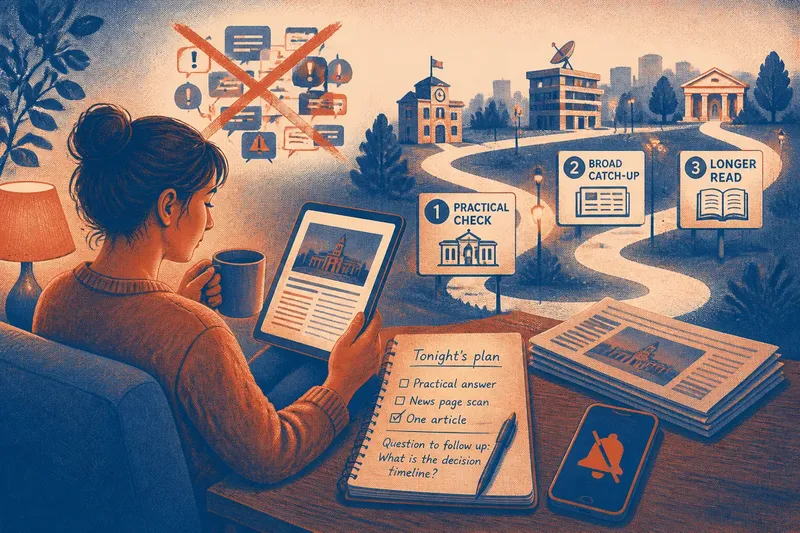
The common mistake in catching up on news after a busy day is opening every alert, feed and group chat at once. The cost is a jumble of updates that can leave you more distracted than informed. A calm routine for catching up on news starts by deciding what kind of reading the evening can accommodate.
Some nights call for one practical answer; others suit a few minutes with a newspaper or radio bulletin. Treat the routine as a boundary around your attention, not a test of how many stories you can absorb.
What kind of reading suits tonight?
Choose between a practical check, a broad catch-up and a longer read. A practical check might mean confirming whether a local service has changed. A broad catch-up might mean scanning a news page and opening one story. A longer read can wait for an evening when you have the time and concentration to follow its detail.
If a phone alert has prompted you to look, pause before tapping it. Decide whether the subject affects a choice you need to make now. If not, leave it for your planned reading rather than letting the notification set the evening’s agenda.
How can you make the reading route simpler?
Choose a starting point that fits the task. A local newsroom or council notice may help with a nearby service; a public-service broadcaster or newspaper can provide a broader account. For a subject you follow closely, use a specialist outlet that explains where its reporting comes from.
Keep the route short. Save useful pages in your browser, or put a chosen news app on your home screen. If a post on social media catches your eye, follow its link to the reporting or document it refers to instead of reading a chain of reposts.
- Check whether the source offers the kind of reading you chose; if it does, start there, and if it does not, switch to a source better suited to the subject.
- Check whether a local question is answered by a nearby newsroom or public body; if it is, use that account, and if it is not, look for the organisation responsible.
- Check whether a social post links to its original report or document; if it does, open the source, and if it does not, leave the post out of your reading route.
- Check whether a second report adds useful context rather than repeating the same update; if it does, read it, and if it does not, move on.
- Check whether a live page is helping you follow an unfolding event; if it is, use it for updates, and if it is not, choose a fuller account or close the page.
- Check whether you still have the attention for a long feature; if you do, continue, and if you do not, save the article for a quieter time.
Say you have heard that a library near your home may close. You want to know whether the council has made a decision, not follow every reaction. You open a local newsroom’s report, then the council’s notice. The notice describes a proposal but no final decision, so you leave knowing the current status without spending the evening on repeated posts.
What should a useful reading session include?
For a quick catch-up, scan the main page of your chosen outlet and open only a story that offers a useful account or context. For a practical question, go straight to the local or specialist source most likely to address it. Avoid treating a live feed as a complete evening’s reading: its short updates are designed to be followed in sequence, while a later report may be easier to read at your own pace.
Give longer pieces room when you choose them. A feature, interview or investigation can reward patient reading, but it need not be squeezed between alerts. Bookmark it with a brief note about why you saved it, so you can decide later whether it still interests you.
When is the reading enough for tonight?
Set a boundary that fits the session: one practical answer, a scan of one news page, or one article read to the end. Stop when you reach it. If a story leaves you with a distinct question that matters to you, note it; if another item would merely repeat what you have read, close the page.
For an unfinished story, write a short note in your phone or on paper: what you want to know and where you might look next. Save a source page rather than a screenshot when you can, so its context remains available. Return at a natural point, such as your next planned reading session, rather than keeping a live page open in the background.
Which reading choice fits your situation?
How do I catch up if I only want a quick overview?
Scan one outlet’s main news page and open a story only if it adds context you want. If the page is crowded with updates, choose a concise bulletin instead and leave the rest for another session.
Should I save a long article for later?
Save it when you cannot give it your attention now, and add a short note about what interested you. If you no longer want to read it when you return, remove the bookmark rather than treating it as an obligation.
What if I keep opening news apps out of habit?
Move the app off your first screen or turn off non-essential alerts. If you still want a regular update, choose a planned time to open it; if the habit persists, use a browser bookmark instead of an always-visible app.
How can I follow a story without reading every update?
Choose a fuller report or a source page that gathers the main developments, then save the specific question you still have. If no clear question remains, stop until your next planned reading session.
A calm routine for catching up on news works best when it makes room for different kinds of reading, not just the latest update. Keep one easy route to useful reporting, save longer pieces for a time that suits them, and let a short note carry an unfinished question forward.